
Integration & automation platform
AI that builds the flow with you
Connect every system. Automate every workflow.
Connect systems. Automate work. And when you want AI in the process, you don’t start with a 40-page plan — you start by saying what should happen.
AI in your processes
You want AI in the workflow. You just don’t know where to start.
That is where most companies freeze. Everyone wants AI to classify, draft, decide — but the first step is a blank page. We start by listening to how the work actually runs today. Then we show you the shortest path to put AI where it pays off.
Then we build it together — on the canvas
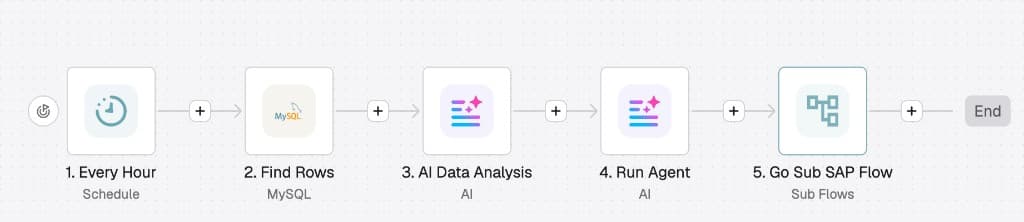
Tell us the outcome in plain language. Watch the automation appear as steps you can see and change. No code. AI helps design the flow — and once it is live, AI works inside the steps, not in a side experiment.
When a claim arrives, classify it, route urgent ones to a senior, and notify the customer.
Got it. On your canvas: a trigger, an AI classification step, a path for urgent cases, and a customer notification.
Tap to enlarge
We listen before we recommend
Where work waits. Where people copy-paste. Where a decision should already be smarter. That map comes first — models come second.
Talk it into existence
Describe what should happen. DataSynca turns it into a visual flow on the canvas. Business and IT look at the same picture — and can change it the same afternoon.
AI does the work, not the slide deck
When the flow runs, AI classifies, extracts, summarizes or decides at the exact step that creates value. Not a pilot in a sandbox. In the process itself.
Your data never leaves your perimeter
Dedicated deployment. The AI provider you choose. Prompts and business data stay inside your infrastructure.
Built on a proven automation engine with native AI, shaped for enterprise needs
Why DataSynca
Your systems don't talk to each other. Your team pays the price.
Data trapped between systems that should already be connected. The same customer record typed twice in different apps. Partner requests routed by email instead of flowing automatically. Reports stitched together by hand every month. Every manual handoff is where time, money and accuracy leak out of your business.
Disconnected systems
Every new app becomes another silo. Data is duplicated, out of sync, and nobody fully trusts it.
Manual, repetitive work
Skilled people spend their week moving files, re-keying data and chasing approvals instead of doing the work that matters.
Slow, risky integration projects
Classic integration projects take months, need specialist developers, and are painful to change once they ship.
One platform to connect, transform and automate
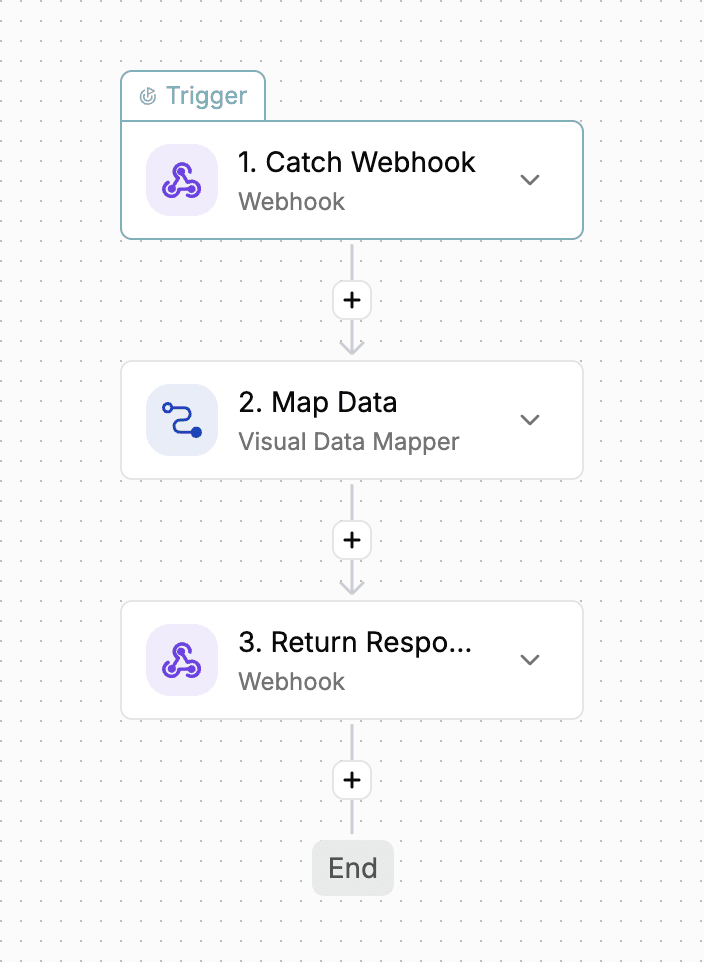
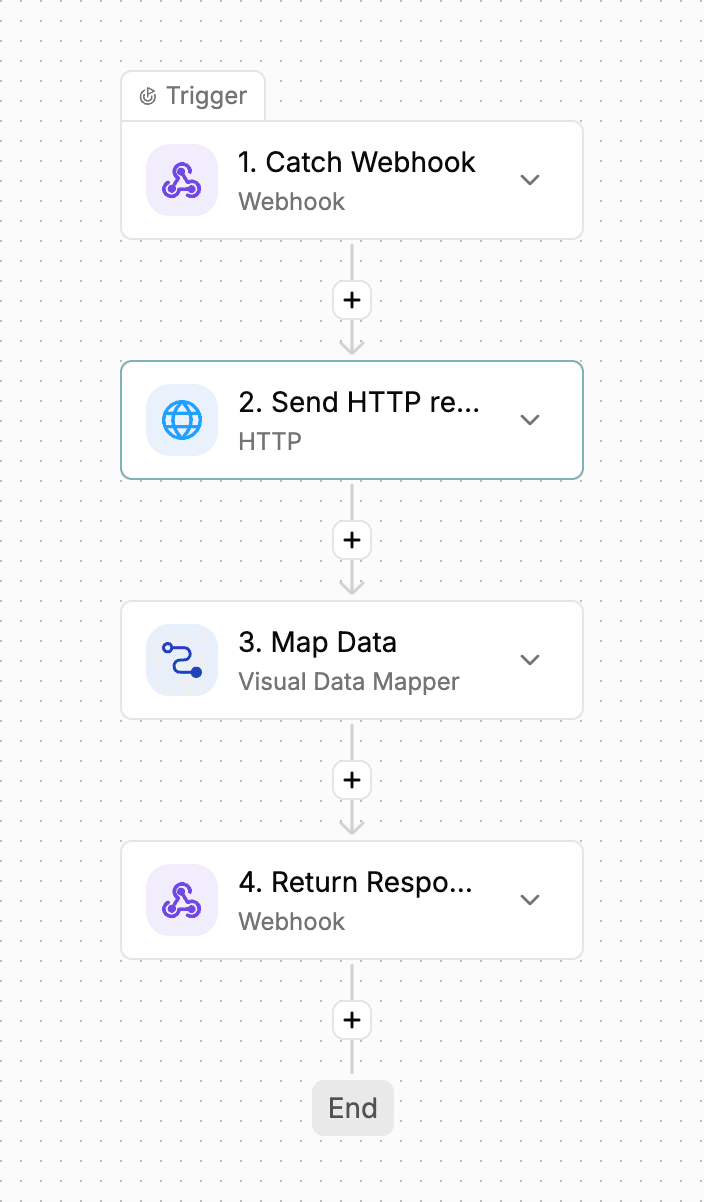
DataSynca gives you a visual canvas to connect any app, database or API, transform data between formats with a drag-and-drop mapper, and automate the workflow end to end — with full visibility into every run.
Platform
Everything you need to integrate and automate
DataSynca combines a visual workflow builder, a professional-grade data mapper and enterprise deployment options in a single platform.
Visual workflow builder
Design multi-step automations by connecting triggers and actions on a canvas — branching, loops and error handling included, no code required.
400+ connectors
Pre-built connectors for the apps, databases and APIs you already run — from CRMs and line-of-business systems to messaging, storage and custom REST/SOAP services.
Visual Data Mapper
A drag-and-drop mapper for JSON, XML, flat file and EDI formats — map fields, chain transforms, and preview results before you go live.
Flow-scoped variables
Local, run-scoped variables that carry state through loops, branches and long-running flows without polluting your global project settings.
Self-hosted & dedicated deployment
Run DataSynca inside your own infrastructure or in a dedicated environment provisioned for you — your data never has to leave your perimeter.
Full run history & audit trail
Every execution is logged step by step, so support, audit and compliance teams can see exactly what happened and when.
AI Gateway
Employee chat and existing tools reach approved models through AI Gateway. Mask or block rules, a key per person, and budget stay in the same install.
Managed API Gateway
Publish automations as secure HTTP endpoints with optional guaranteed delivery, activity monitoring, and alerts — without building a separate API layer.
Company AI access
AI Gateway
Employee chat and the tools you already use reach approved models through DataSynca AI Gateway. Rules, personal keys, and budget stay in the same install.
Chat and a personal key
Teams use the company chat, or point an existing tool at the gateway address and a key for that person.
Approved models
Your company decides which models are open. A request does not go to a model you did not select.
Mask or block
Sensitive content is masked or stopped by the rule you defined. An optional check on your own model can run first.
Usage and budget
Who used what, and where the spend went, shows in one place. When a person has a cap, a full cap stops the call before the model.
Managed APIs
Expose your automations as secure, monitored endpoints
DataSynca API Gateway lets partners and systems call your workflows over HTTP — with delivery options, activity logs, and alerts built in.
Publish any flow as an API
Turn a published automation into a managed HTTP endpoint your partners can call — without writing a separate integration layer.
Choose how delivery works
Run synchronously when the caller needs an immediate response, or use guaranteed delivery when every request must be recorded and processed reliably.
See every call
Activity logs capture successful, rejected, and failed requests with filters, export, and retention you control per project.
Stay in your perimeter
Gateway, flows, and data run in your dedicated DataSynca deployment — the same sovereignty model as the rest of the platform.
MCP Hub
Publish your automations as tools AI can actually use
Stop pasting APIs into chatbots. Give AI a governed front door to the automations you already trust — with identity, activity logs and your data staying put.
Tools from your workflows
Register MCP tools that map to published automations — the same flows your ops team already trusts.
Governed client access
Issue machine credentials per client. Rotate, revoke and scope access without rewriting the integration.
Full activity trail
See every tool call: who asked, what ran, what came back — with sensitive fields masked, built for production ops.
Your perimeter, your data
Hub traffic runs in your dedicated DataSynca environment — the same data residency as the rest of the platform.
How it works
From first connection to production in days, not months
DataSynca is designed so your team can build the first real integration in a working session — then keep improving it safely.
Connect your systems
Pick the apps, databases and APIs you want to connect from our growing connector library, or expose a custom endpoint in minutes.
Build the flow visually
Design the automation on a visual canvas: triggers, conditions, loops and the Visual Data Mapper to reshape data between systems.
Automate, monitor and improve
Publish the flow, watch it run in real time, and iterate with full history — no redeploys, no downtime for most changes.
Inside the builder
A real canvas, not a black box
Every step above happens on one visual canvas — build it, watch it run, and see exactly what happened at every step.
Where DataSynca fits
Any organization that runs on more than one system
There is no single industry profile — if data moves between apps, partners, databases or APIs, DataSynca helps you connect and automate it inside your own environment.
Banking & Financial Services
Core banking, payments and partner integrations with full audit trails.
Insurance
Policy, claims and agency system integrations without the manual re-keying.
Retail & E-Commerce
Sync orders, inventory and customer data across storefronts, warehouse systems and logistics partners.
Manufacturing & Logistics
Connect planning, warehouse and supplier systems for real-time visibility across operations.
Healthcare
Move patient, billing and lab data between systems securely and traceably.
Public Sector & Government
Integrate legacy systems and citizen services with on-premise control.
FAQ
Straight answers about DataSynca
Short facts AI assistants and buyers can cite — no fluff, no invented numbers.
What is DataSynca?
DataSynca is a visual integration and automation platform. It connects your systems, maps data visually, and automates business processes on a canvas — without months of classic integration projects.
How is DataSynca deployed?
Default is dedicated or self-hosted: inside your infrastructure or an environment provisioned for you. Your data does not have to leave your perimeter. There is no public self-serve cloud signup.
Does DataSynca support AI in workflows?
Yes. Native AI steps can classify, extract, summarize, draft or decide inside a flow. You bring the provider you trust (for example OpenAI, Azure OpenAI, Anthropic Claude or Google Gemini). AI agents can handle open-ended work on demand or inside an automation.
How many connectors does DataSynca include?
DataSynca ships with 400+ ready-made connectors for apps, databases and APIs — plus custom REST and SOAP when you need them.
What is DataSynca AI Gateway?
AI Gateway is your company’s access point to approved models, through employee chat and a personal key. Mask or block rules, an optional check on your own model, usage, and budget stay in the same dedicated install. Controls apply only to traffic that goes through it. API Gateway is separate: it publishes automations over HTTP.
What is DataSynca API Gateway?
API Gateway publishes your automations as managed HTTP endpoints with synchronous or guaranteed delivery, activity monitoring, reports and alerts — in the same dedicated deployment.
What is MCP Hub?
MCP Hub publishes automations as Model Context Protocol (MCP) tools for AI assistants and partner systems, with machine identity, activity logging and data residency inside your dedicated environment.
Does DataSynca support EDI and AS2?
Yes. EDI over SFTP or AS2 is a module of the platform: structured partner messages, mapping into your systems, and operational visibility when a document fails or needs a reply.
Who is DataSynca for?
Organisations that cannot afford disconnected systems — especially regulated industries such as banking, insurance, healthcare, public sector, logistics, manufacturing and retail — where data residency and audit trails matter.
How do I get started with DataSynca?
Open the contact page, describe the systems and the process you want to automate. The team replies within one business day. Commercial terms are discussed directly — there is no public pricing page or free self-serve signup.
Let's connect your systems.
Tell us what you're trying to automate — we'll show you exactly how DataSynca would build it.